
A softphone lets your customers make and receive business calls from a laptop or smartphone — no desk phone required. But a softphone on its own is just an app. It only becomes useful once it's connected to your phone system. That connection — softphone integration — is what links the app to your SIP infrastructure so calls actually route, ring, and connect. This guide explains how softphone integration works, what you need to set it up, and how to roll it out to users without manual headaches.
What softphone integration actually means
A softphone integrates with your phone system through the SIP protocol (Session Initiation Protocol) — the standard that handles setting up, managing, and ending voice and video calls over IP. When a softphone is "integrated," it's registered to a SIP account on your PBX or VoIP platform, just like a physical desk phone would be. From there it can place calls, receive them, transfer, hold, and use the features your system supports. In short: integration is the bridge between the app on the user's device and the calling backbone you already run.
Some platforms add a layer of security here. Ringotel, for example, acts as a secure VoIP tunnel that routes voice traffic from softphone users to the connected PBX — encrypting signaling and media with standard TLS and SRTP, with no VPN or SBC required.
What you need for softphone integration
- A SIP-based phone system — a PBX or VoIP platform that speaks SIP. Ringotel works with FreePBX, FusionPBX, FreeSWITCH, VitalPBX, Askozia, Vodia, PortaOne, Twilio, 3CX, mPBX, 2600Hz KAZOO, and more.
- SIP credentials for each user — username, password, domain/server, and port. These register the softphone to the right extension.
- Network readiness — proper firewall/NAT settings so SIP traffic and media (RTP) flow correctly.
- A softphone client — desktop and/or mobile app that supports your SIP setup and the features you want to offer.
How the connection works (step by step)
1. Enter SIP credentials — the softphone is configured with the user's SIP account details (manually or, better, automatically — see provisioning below).
2. Registration — the softphone registers to the SIP server, telling it "this user is reachable at this device."
3. Call signaling — when a call is placed or received, SIP handles the setup between endpoints.
4. Media flow — once connected, the actual audio/video travels via RTP between the parties.
5. Features layer on top — transfer, hold, conferencing, messaging, and presence work through the system's capabilities.
Manual setup vs. automated provisioning
Configuring SIP credentials by hand works for one or two users — but for a provider rolling out to dozens or hundreds, manual setup doesn't scale and invites errors.
Automated provisioning solves this: instead of typing server addresses and passwords into each device, users are onboarded through a central admin portal or API. They receive an invite (often with a QR code or one-tap link), and the softphone configures itself. For providers, this is the difference between a deployment that takes minutes and one that takes days.
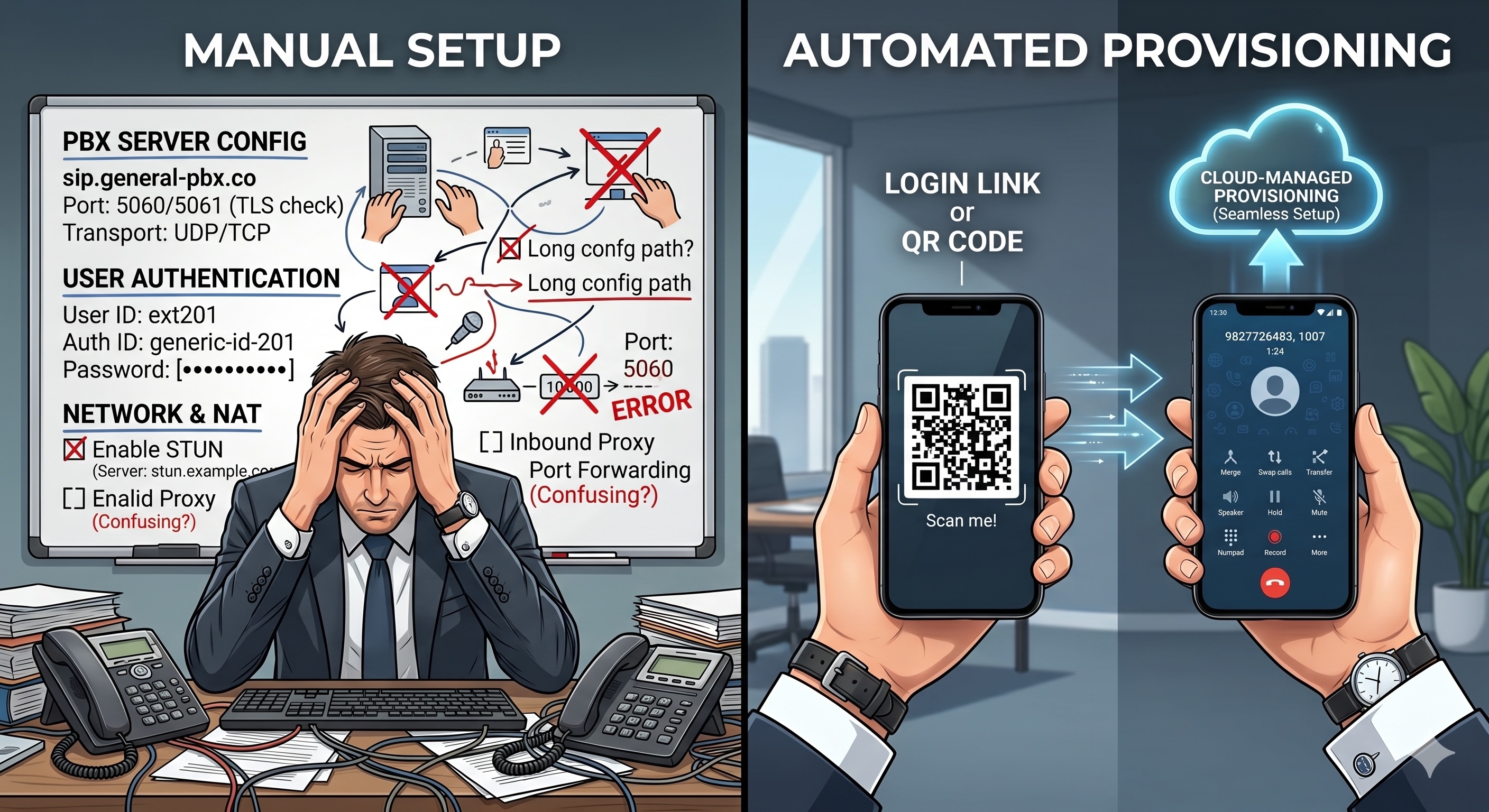
This is where a purpose-built platform matters. Ringotel, for example, connects to standard SIP systems and provisions users centrally — admins manage accounts from one portal, and end users get set up with automated invites, across desktop, iOS, and Android.
Common softphone integration issues (and how to avoid them)
- One-way or no audio — almost always a NAT/firewall issue blocking RTP media. Check port forwarding and SIP ALG settings.
- Registration failures — wrong credentials, server address, or port; or the account isn't provisioned correctly.
- Calls drop or won't connect — often network/codec mismatches between the softphone and the system.
- Manual setup errors at scale — avoided by using automated provisioning rather than per-device config.
Conclusion
Softphone integration comes down to one thing: connecting the app to your SIP system so it behaves like a full-featured business phone. The technical pieces — SIP registration, credentials, network setup — are well established. The real differentiator for providers is how easily you can roll it out: manual configuration doesn't scale, while automated provisioning lets you onboard users quickly and reliably. Get the integration right, and a softphone becomes one of the most flexible tools you can offer your customers.
Want to see how a softphone connects to your SIP system in practice? See how Ringotel works.
New to combining calling and collaboration? Read our guide on how to integrate UC with VoIP.
Looking to connect your softphone to CRMs and automation tools instead? Explore Ringotel integrations.